
Everything you need for league night
Find your information
Choose Player (View Only) to browse without a PIN.
- Matches: dates, venues and results.
- Standings: team records and points.
- Players: names, teams and ratings.
- Venues: locations and machine lists.
Run a match
- Sign in. Choose your role and team, then enter your PIN.
- Start the match. Open Matches, select your match, and tap Start Match & Submit Lineups.
- Submit your team. Select tonight's players, check the rating total, and submit.
- Set up the round. Choose machines and who plays each game using the order below.
- Score. Enter each game's scores and tap Save Game.
- Finish. Review the results and tap Finalize Round. After five rounds and any tiebreaker, complete the match.
Who chooses machines and players in each round?
Away goes first in rounds 1 and 3; home goes first in rounds 2 and 4.
- The declaring team chooses machines and its players, then taps Submit Lineup.
- The responding team chooses its players, then taps Submit Response → Start Round.
Choose from your submitted match lineup. Use each player or Missing Player slot once per round.
Team roles and PINs
- Captain or co-captain: run the team's match, choose players and machines, and finalize results.
- Scorer: enter either side's scores in your team's match. Several scorers can work on different games at once.
The captain manages the optional Co-Captain and Scorer PINs in Team Access. Share them privately; teammates use their own phones. The same scorer PIN works across your team's matches that season.
Resetting or disabling a helper PIN blocks their existing sessions. Co-captains and scorers cannot manage PINs.
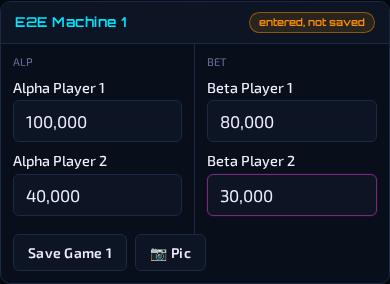
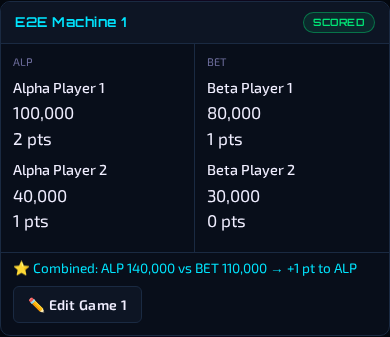
What does a saved game look like?
How points work
Rounds 1 and 4: three doubles games. Rounds 2 and 3: six singles games.
Singles
A win earns 2–1, or 3–0 if the winner scores at least double.
- 150,000 against 100,000 gives 2–1.
- Exactly 200,000 against 100,000 gives 3–0.
- A positive score against zero gives 3–0.
- Equal positive scores give 1–1; two zeros give 0–0.
Doubles
Each player earns one point for each opposing score they beat. The team with the higher combined score earns one bonus point. Tied comparisons and tied totals earn no point.
Example: 100,000 and 40,000 against 80,000 and 30,000 gives 4–1: two points for the first player, one for the second, and one team bonus.
Enter four individual scores per doubles game.
Find a sub
- As a captain or co-captain, open Players → Find a Sub.
- Search names, check ratings, or sort by Alphabetical, Recently subbed, or Most times subbed.
- Tap Text or Call and arrange the date and venue.
- If they agree to play, select them when submitting your match lineup.
What does the sub history show?
How often and how recently each current substitute appeared in a submitted lineup this season. "Never subbed" means no appearances are recorded this season.
A new substitute isn't in the list
Captains can use Players → All Players → Add Player. The new player is available in Find a Sub and lineup selection immediately. Commissioner review can happen afterward.
Round 5 and tiebreakers
Home chooses StallBall or Split Flipper. To change the format, return to the Round 5 overview before scoring begins.
StallBall
Select the machine, mark the survivors, and tap Finalize StallBall. Each survivor earns one point: three survivors against one gives 3–1. At least one survivor is required.
Split Flipper
Choose each pair's left- and right-flipper players. Enter one score per pair in each of the three games. Each game awards 2–0 for a win or 1–1 for a tie. Save all three, then tap Finalize Split Flipper.
Tied match
Play the opposite format from Round 5. The winner earns one match point.
- StallBall: continue until only one team has survivors.
- Split Flipper: save all three games; the team with more game wins wins. If game wins are tied, ask the commissioner.
When a player is missing
Submit only the players present. The app adds Missing Player slots to make six: select five players and it adds one; select four and it adds two. The submit button shows how many will be added.
Choose which games those slots go into when setting up each round.
- Doubles: each missing player's score is fixed at 1. Enter the other scores normally.
- Singles: tap Confirm Forfeit. The present side receives 3 points, the missing side 0. If both are missing, the result is 0–0.
These rules apply to rounds 1–4.
If something goes wrong
Refreshing reopens your match or round. Unsaved score entries are not kept.
Wrong score or player
Wrong score: tap Edit Game, correct the score, and save.
Wrong player: unlock a saved game with Edit Game first, then choose the correct player. Player assignment changes apply only to rounds 1–4. Captains and co-captains change their own side; the commissioner can change either side.
Confirmed forfeit: tap Reopen Forfeit, then Reopen for correction.
Someone arrived late
Late arrivals sit out any round already started, including round setup.
- After the round is finalized, open the match and tap Edit Roster.
- Select the arriving player and resubmit. Assign them when setting up the next round.
Lineups can only be changed between rounds. Earlier rounds keep their players and scores.
Correct a finished round or match
Captains and co-captains can reopen a completed round or tiebreaker in their own team's active match using its edit/reopen action. Only the commissioner can reopen a completed match.
Reopen the match first if needed, then the round. Correct and save the game, re-finalize the round, and check the match total. Enter a reason when prompted.
Can't finish a round
Check for blank scores, an unsaved edit, an unconfirmed forfeit, or missing players or machines. Open the game named in the message and finish it.
Player list or contact problem
Tap Refresh players if the list looks out of date. For missing names or contact details, ask the commissioner.
Connection or sign-in problem
Reload and check any recent save. If your session expired, sign in again. If another scorer changed the same game, review their saved result before retrying. For help, send the commissioner the match, round, game, and exact error message.